GTM Engine · · 6 min read
Safari vs Chrome on Mac: what Apple's switch page teaches about GTM
 By Harshil Jani
You would expect a page built to win over Chrome users to simply say Chrome is worse. Apple's Switch to Safari page, launched 12 October 2026, says that, but I think its most useful lesson is somewhere else. It is a "switch from X" campaign: a go-to-market (GTM) play aimed at people who already use a rival.

In this article
- Where a switch campaign fits in GTM: reason first, ads later.
- What Apple's page claims about Safari vs Chrome on Mac, and what its small print says.
- The part I would copy, plus a one-week exercise.
Where does a "switch from X" campaign fit in GTM?
It answers one question: why should someone leave what they use for yours? That is positioning, meaning your reason to be picked over the alternative.
In my go-to-market order (buyer, positioning, price, channel, sales motion, measure), it is step 2 (what go-to-market actually is). A switch campaign aims it at one named rival, so the buyer is already chosen: that rival's users. Only once you know why they should move do you pick the channel, meaning where the message reaches them, such as ads.
Think of it like opening a coffee shop opposite a busy one. You know who to talk to, the people in the other queue. You need a reason for them to cross the road.
Apple's queue is long. On desktop computers worldwide, Windows and Mac together, Chrome had 65.14% of page views in September 2026 and Safari had 8.06% (StatCounter, 2026).
That count covers only sites running StatCounter and includes Windows, where Apple does not offer Safari. So it is not a Mac-only share, and I have not found a public Mac-only figure.
Desktop browser share worldwide, September 2026
What did Apple launch?
A web page and two short videos: 9to5Mac reported a new "Switch to Safari" page and "a pair of new YouTube videos" on 12 October (9to5Mac, 2026). MacRumors said the campaign "encourages Chrome users to switch to Safari as their web browser of choice on the Mac" (MacRumors, 2026).
Safari is a more powerful and private browser than Chrome.
Apple Switch to Safari page, October 2026
Each video sells one feature: "Safari Helps Keep Trackers Away" and "Safari Helps Keep Distractions Hidden". Both descriptions send viewers to the same page, apple.com/safari/switch: one reason per ad, one place to land.
Apple has gone after Chrome before. Its June 2026 "Clingers" film showed online trackers as characters "dressed head to toe in chrome-colored tracksuits", who explode when a woman switches to Safari (Adweek, 2026). That film sold a mood. A page has to make a case, so what does it lead with?
What does Apple say Safari does better than Chrome on Mac?
Battery life, in the first of four headline claims: "Safari offers up to 5 hours more video streaming on your Mac compared with Chrome" (Apple).
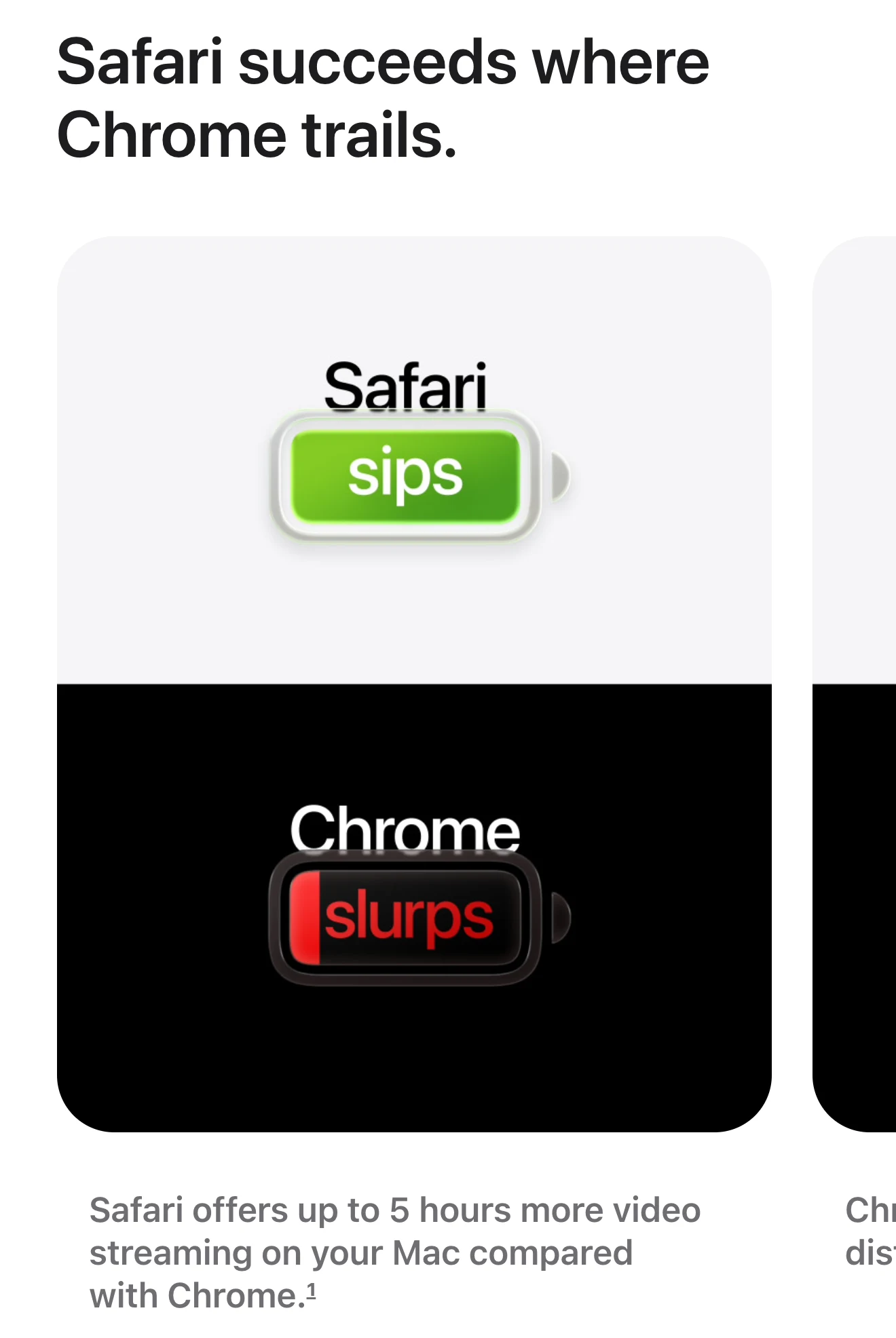
I think battery is the right lead, because on a Mac it is the claim Chrome can least answer. Apple makes the chip, the operating system and the browser it tested, and a strong switch reason is one only you can say.
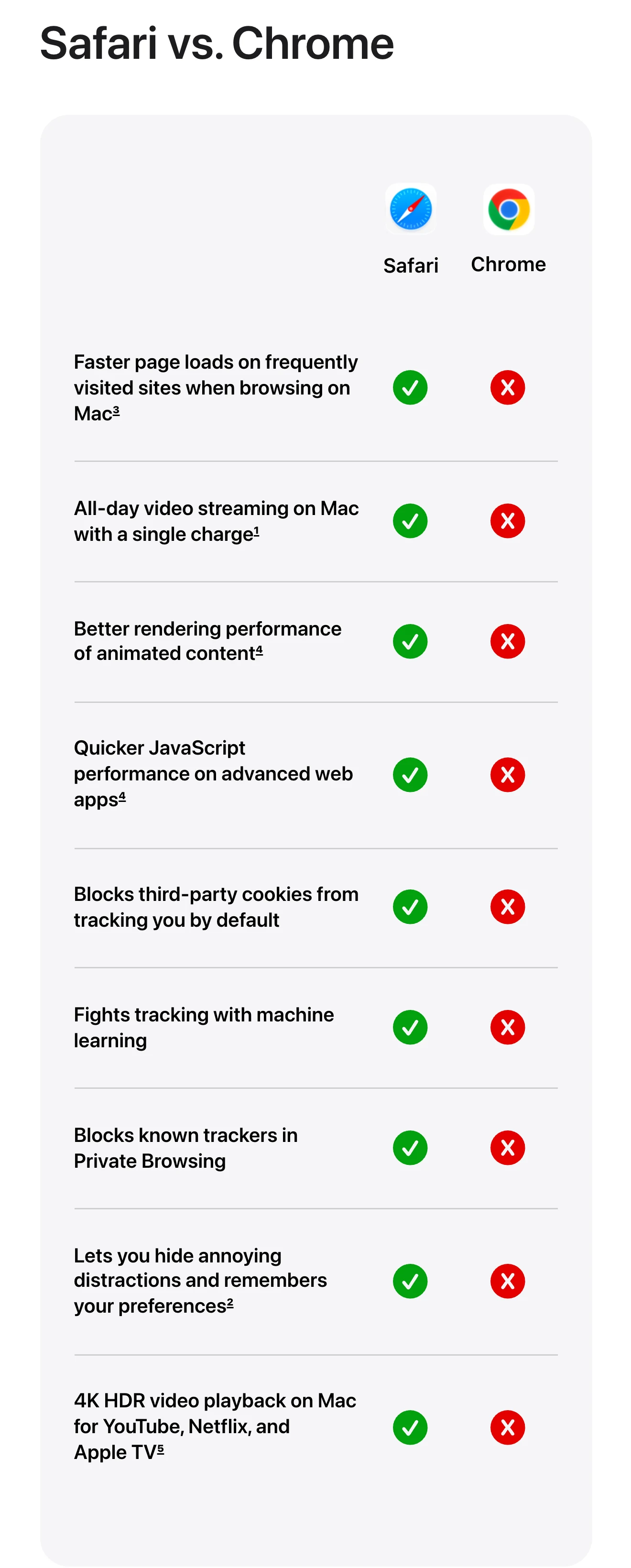
Lower down, a chart lists nine features and gives Safari a tick and Chrome a cross on each row. It looks like a clean win, but the small print is more useful.
How does Apple back up its numbers?
With footnotes, small numbered notes that say how Apple ran each speed and battery test. For the claim that Safari loads frequently visited sites "up to 35% faster", Apple tested "snapshot versions of 12 popular websites under simulated network conditions". That means saved copies of the sites on a simulated connection, not the live internet. The test ran in August 2026 on a 15-inch MacBook Air with M5, with an unreleased Safari 27.0 against Chrome v151 (Apple).
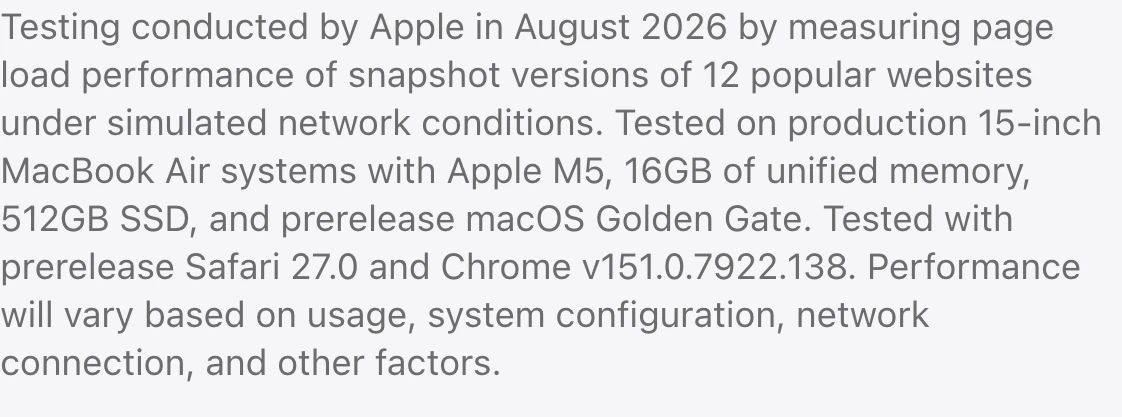
The footnote also shows the limits: Apple's own unreleased browser, Apple's own laptop, twelve unnamed sites. And "up to" reads as the best case, not the average.
Think of it like a recipe that says "ready in 20 minutes" and admits the onions came pre-chopped. Knowing the catch makes the number easier to trust. Some chart rows have no footnote, though, and that is where Google can push back.
Where could Google push back?
On privacy, where the rows carry no footnotes. One covers third-party cookies, small files other companies use to follow you from site to site.
In April 2025, Google's Privacy Sandbox lead wrote that Chrome's private mode "already blocks third-party cookies by default" (Google Privacy Sandbox, 2025). In normal mode, Chrome leaves that choice with the user.

We'll continue to enhance tracking protections in Chrome's Incognito mode, which already blocks third-party cookies by default.
Anthony Chavez VP, Privacy Sandbox, Google
So Google's own words back Apple's row on blocking those cookies by default in normal mode. Apple's private-mode row says "Blocks known trackers in Private Browsing", which is about trackers, not cookies.
Both can be true, but a reader who knows Google's line may trust that cross less. That is the cost of a chart where the rival loses on each row. And winning on paper is only half the job.
How does Apple make switching easy?
It makes the move short. In Chrome on a Mac, the page's Switch to Safari button uses a special link starting x-safari-https. Safari registers that link type with macOS, so a click is meant to open the page in Safari instead.
Then three steps make Safari the default browser, the one your Mac opens links in. Apple's support guide explains how to bring over "bookmarks, history and passwords" from Chrome (Apple Support).
It answers the reasons people stay, out loud, in Apple's words:
| The objection | Apple's answer on the page |
|---|---|
| My bookmarks and passwords | "you can automatically import them when you first start using Safari" |
| My extensions | "Yes, Safari offers extensions that let you block ads..." |
| My work apps | "Google Docs, Sheets, Slides, and other Google Workspace apps work great in Safari" |
| My Windows or Android devices | "Safari is available on macOS, iOS, and iPadOS" |
The last row is basically a no, softened by a bookmark sync for Windows. It is the line I would copy first.
What does this mean for your GTM strategy?
A switch page is your case against one rival, written down, so write it before you spend on ads. Apple's version has four parts.
Now the lesson from the top. The parts of Apple's page I would copy are the ones that admit a limit: the footnote with its twelve unnamed sites, and the plain no on Windows. The part a sharp reader can question is the all-ticks chart, because Google's own blog can make one cross look less clean.
My take: a switch page earns trust by showing how you tested and where you lose. Then build the one-click move, because I think effort is what most often stops a yes. Judge the page by finished moves, not ad views.
Run it this week
- Name the one rival your buyers use today, and write the one reason to switch that it cannot claim back.
- Measure that reason yourself, then write a footnote: what you tested, when, on what setup, and what it leaves out.
- Time the switch: sign up as a rival's customer and count the minutes to move your data across. Build an import if it takes over ten.
- Collect three objections from sales calls or support tickets, and answer each in one sentence, honest no included.
- Publish one page and one ad with a single reason, and track how many visitors complete the switch.
Questions people ask
Should I switch to Safari from Chrome?
On a Mac, Apple's own tests claim up to 5 more hours of video streaming and up to 35% faster loads on 12 sites it picked. Rely on Chrome-only extensions or also use Windows? Check those first, since Apple says Safari is available on macOS, iOS and iPadOS.
Is Safari better than Chrome on Mac?
Apple says so, based on its own tests of an unreleased Safari against Chrome v151 on a MacBook Air M5. I have not found an independent test of those two figures, so treat them as Apple's best case.
How do I transfer bookmarks to Safari from Chrome?
Open Safari on your Mac and choose File, then Import From Browser, then Google Chrome. Apple says this brings over bookmarks, history and passwords, and Chrome must still be installed.
Does Safari have extensions?
Yes. Apple's page says Safari offers extensions for ad blocking, shopping discounts and offline reading, though the set available may differ from Chrome's.
What is a competitor comparison page?
A page comparing your product with a named rival, feature by feature, to win that rival's users. The useful ones show how each claim was tested and make switching easy.
Got this by email? Hit reply: what is the one reason your buyers stay with a rival, and does your site answer it yet?
Harshil
Sources
- StatCounter, 2026 gs.statcounter.com
- 9to5Mac, 2026 9to5mac.com
- MacRumors, 2026 macrumors.com
- Safari Helps Keep Trackers Away youtube.com
- Safari Helps Keep Distractions Hidden youtube.com
- Adweek, 2026 adweek.com
- Apple apple.com
- Google Privacy Sandbox, 2025 privacysandbox.google.com
- Apple Support support.apple.com